|
Open
up
"My
Computer",
then
open
"Dial-Up
Networking".
Then
open
"make
new
connection". |
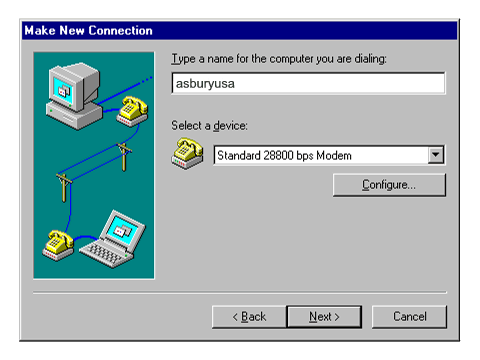
Type
in
"asburyusa"
for
the
name
of
the
computer.
In
the
section
that
says
select
a
device:,
you
should
already
have
your
modem's
name
displayed
in
it.
Click
the
Next
button.
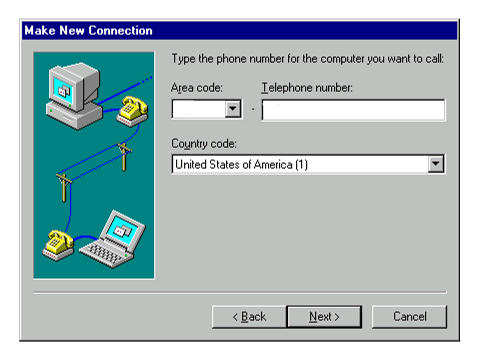
The
next
window
will
ask
for
the
area
code
and
telephone
number
to
dial.
Type
in
your
area
code
your
local
access
number
then
click
the
Next
button.
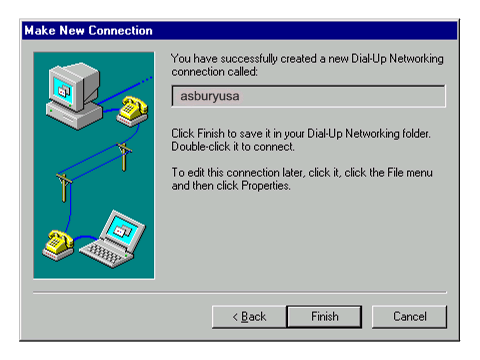
Click
the
Finish
button
to
complete
the
creation
of
a
asburyusa
connection
icon.
The
next
process
is
to
edit
the
asburyusa
connection
icon.
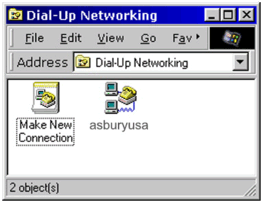
You
should
have
a
window
that
looks
like
the
one
below.
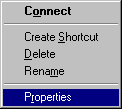
Right
click
with
the
right
mouse
button
on
the
asburyusa
icon.
The
window
below
should
appear.
In
that
window
select
the
word
Properties.
After
you
select
Properties
the
window
below
will
appear.
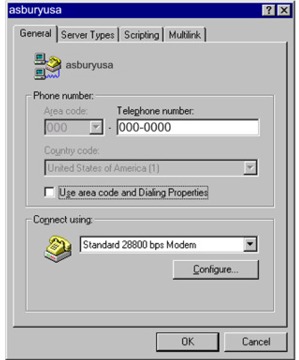
The
properties
window
will
appear
and
will
have
the
General
tab
selected
by
default.
In
this
window
make
sure
that
the
telephone
number
is
correct.
If
you
area
code
is
in
the
area
code
section
then
skip
down
to
were
it
says
Use
area
code
and
dialing
Properties.
Next
to
that
there
will
be
a
check
in
the
box.
Click
on
the
check
mark
to
remove
it.
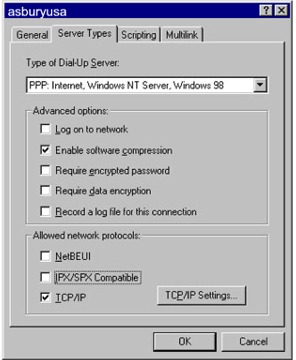
Next,
click
on
the
Server
Types
tab.
In
the
server
types
window,
uncheck
the
log
on
to
network.
NetBEUI
and
IPX/SPX
compatible.
The
items
that
should
have
a
check
mark
in
the
box
are
enabled
software
compression
and
TCP/IP.
Click
OK
Next
Right
click
on
the
asburyusa
icon
and
then
click "create
shortcut"
then
click
yes.
Now
that
icon
will
show
up
on
your
desktop.
Click
on
the
asburyusa
connection
on
your
desktop
and
then
enter
your
user
name
and
password
and
then
click
connect. |